
WARNING: This product contains nicotine. Nicotine is an addictive chemical.WARNING: Contains nicotine, an addictive chemical.
Lost Mary Instructions and User Manual
Everything you need to set up, charge, and get the most out of your Lost Mary. This guide covers the Nera Fullview 70K, MT35000 Turbo, and MO20000 Pro, including LED indicators, dual-pod switching, and fixes for common issues.
Quick Start Setup
Unbox and verify
Remove the device from the packaging and scan the anti-counterfeit code on the box to confirm it is authentic. Peel off any protective film.
Charge before first use
Plug a USB-C cable into the charging port. Most Lost Mary devices arrive partially charged, but a full charge before first use gives the best draw.
Insert the pod (Nera Fullview 70K)
For the refillable Nera Fullview 70K, slide a pre-filled pod into the device until it clicks. The screen lights up when the pod is seated correctly.
Draw to activate
Lost Mary devices are draw-activated. There is no power button. Simply inhale from the mouthpiece and the device fires automatically.
How to Charge Your Lost Mary
Every modern Lost Mary device charges over USB-C. Use a standard 5V wall adapter rated at 1A to 2A, or a computer USB port. Avoid high-output fast chargers, which can shorten battery life.
Plug the cable into the charging port on the bottom or side of the device. The LED or on-screen indicator shows charging progress. A full charge typically takes 30 to 60 minutes. Unplug once the indicator shows full so you do not leave it on the charger overnight.
For more detail, read our complete Lost Mary charging guide.

LED and Display Indicators
Solid white / green
Battery full or high. Ready to vape.
Blue
Battery at a medium level. Still plenty of charge.
Red or flashing
Low battery. Connect a USB-C cable to recharge.
Screen shows puff / battery bars
On display models (MO20000, Nera 70K) the screen shows remaining e-liquid and battery percentage.
Dual-Pod Switching: Nera Fullview 70K
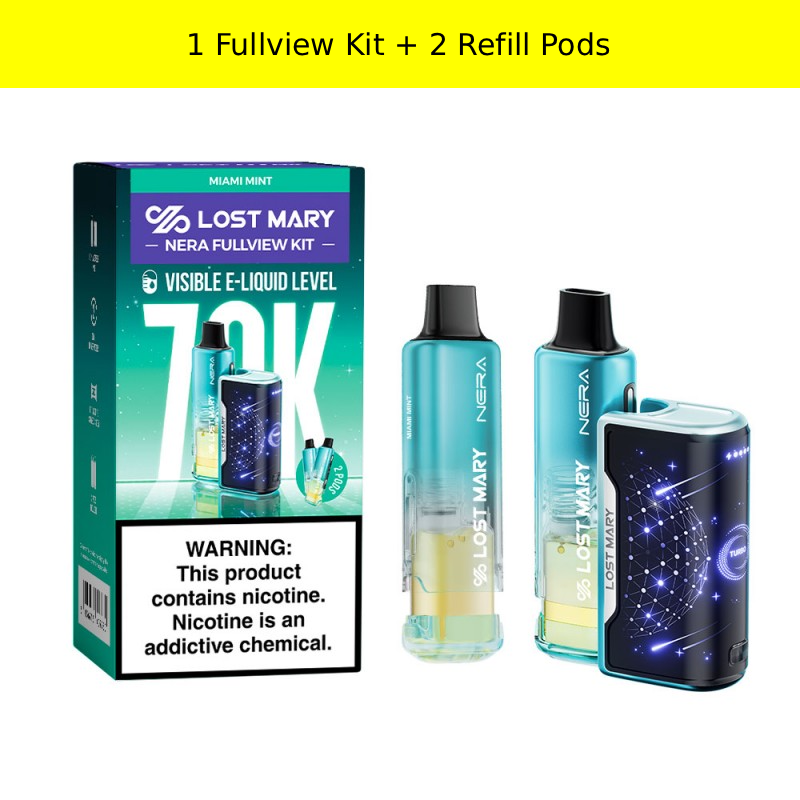
The Nera Fullview 70K is a refillable pod system. Each device runs on pre-filled pods, and the full-view tank lets you watch the e-liquid level so you always know when to swap.
- Pull the empty pod straight up and out of the device.
- Line up the new pre-filled pod with the slot.
- Push it in until you hear and feel a click.
- The screen lights up to confirm the pod is seated and ready.
Learn more in our Nera Fullview 70K pods guide.
Troubleshooting Common Issues
How do I charge a Lost Mary vape?
Connect a USB-C cable to the charging port on the bottom or side of the device. A wall adapter rated 5V/1A is ideal. Avoid fast chargers above 2A. A full charge usually takes 30 to 60 minutes, and the LED or screen indicator turns off or shows full when complete.
Why is my Lost Mary not hitting?
First, make sure it is charged. If it is charged but still not firing, take slower, gentler draws, as hard pulls can trigger the auto-cutoff. On the Nera Fullview 70K, reseat the pod so it clicks into place. If the device still does not respond, the e-liquid may be depleted. See our detailed fix guide for more steps.
Why does my Lost Mary taste burnt?
A burnt taste usually means the coil is running low on e-liquid or has overheated from chain vaping. Let the device rest for a few minutes between draws. On the Nera Fullview 70K, switch to a fresh pod. If the device is near the end of its puff count, the burnt taste signals it is finished.
How do I switch pods on the Nera Fullview 70K?
The Nera Fullview 70K uses a dual-pod system. Pull the empty pod straight out of the device, then insert a new pre-filled pod until it clicks. The full-view tank lets you see the e-liquid level at all times, so you can swap before the pod runs dry.
What do the LED lights mean on the MT35000 Turbo?
The MT35000 Turbo uses a simple LED to show battery status: bright when charged, dimming as the battery drops, and flashing red when it needs charging. Connect USB-C to recharge.
How long does a Lost Mary last?
It depends on the model and how often you vape. The MT35000 Turbo delivers up to 35,000 puffs and the Nera Fullview 70K up to 70,000 puffs across its pods. For most users, that translates to several weeks of use per device or pod.
Still stuck? Read the full Lost Mary not hitting fix guide or contact our support team.
Troubleshooting and Guides
Ten support guides covering the questions we get most often, from clogged airways and burnt taste to charging, storage, travel rules, and how these devices work.
Browse every article in the Guides category.